Microsoft Secure Score: Is Your Microsoft 365 Environment Actually Secure?
IT Club — Powered by Altitude IT (opens in a new tab)

Keep up with IT Club
Add IT Club as a preferred source in Google Search.
Microsoft Secure Score measures Microsoft-recommended control adoption across supported services. A higher score can indicate stronger use of those controls but does not guarantee protection. Businesses should prioritise recommendations by real risk, test changes carefully, document exceptions and monitor for configuration drift — not chase the highest possible percentage.
Quick Answer
Microsoft Secure Score is a useful list of recommended controls, not a certificate that Microsoft 365 is secure. Use it to find and prioritise gaps, but judge each recommendation against real risk and business context.
- Prioritise identity, administrator access, legacy authentication and external sharing.
- Test restrictive changes before applying them broadly.
- Record justified exceptions and who owns them.
- Keep monitoring for compromised accounts, drift, backup gaps and response weaknesses.
A business opens Microsoft Secure Score for the first time. The dashboard shows a percentage and a list of recommended actions — administrator MFA, legacy authentication, guest access, mailbox forwarding, application consent, privileged roles, device configuration, SharePoint sharing, audit controls, phishing protection.
The business sees the number and draws a conclusion. If the score is low, Microsoft 365 must be insecure. If the score is high, the environment must be safe. Neither conclusion is reliable without context.
A low score may reflect missing licences, products not yet configured, legitimate business exceptions, unreviewed recommendations or genuine security weaknesses — and often a combination of all five. A high score may exist alongside compromised accounts, weak operational procedures, poor backup, unmanaged administrators, risky third-party applications, stale guest users, configuration drift or untested incident response.
A percentage can start the conversation. It cannot finish the security assessment.
The Quick Answer
Microsoft Secure Score shows how many Microsoft-recommended security actions the organisation has implemented across supported services.
A higher score generally indicates that more supported recommended controls are in place. It does not prove that:
- The organisation cannot be breached
- Every important risk is covered
- Recommendations were implemented correctly
- Controls suit the business
- Exceptions remain appropriate
- Settings will remain secure
- Threats are being monitored
- Backups can be restored
Businesses should use Secure Score to: identify recommendations; understand the risk behind each one; check licensing and technical dependencies; prioritise high-impact improvements; test changes; record exceptions and compensating controls; verify implementation; and monitor the score and underlying controls over time.
Do not enable a control merely for points without understanding the user, application and operational impact.
Last checked: 6 August 2026. Verify all portal locations, navigation, terminology and score details against current official Microsoft documentation before acting.
What Microsoft Secure Score is
Microsoft currently describes Microsoft Secure Score as a numerical summary of an organisation's security posture across supported Microsoft services. It reflects selected security configurations, user behaviour, completed recommended actions, enabled Microsoft services and current licensing.
The score is available through the Microsoft Defender portal. The current direct route is security.microsoft.com/securescore — verify this remains current before directing others to it. Accessing the score requires an appropriate role, such as Global Administrator, Security Administrator, Security Reader or Global Reader.
Microsoft states that Secure Score is not an absolute measure of how likely the organisation or its data is to be breached. It measures recommended control adoption, not security outcomes.
Microsoft Secure Score is a useful security indicator. It is not a security verdict.
Secure Score covers recommendations across four broad areas — Identity, Devices, Apps and Data — though the recommendations available to a specific organisation depend on the Microsoft products in use, assigned licences, enabled services, device onboarding, tenant configuration and security products deployed.
What Microsoft Secure Score is not
Secure Score is not a security certification. It is not proof that Microsoft 365 is secure. It is not a predictor of whether a breach will occur. A specific score does not guarantee protection.
Secure Score is also not the same as Microsoft Secure Score for Devices, which measures device posture separately through Microsoft Defender for Endpoint. It is not the same as Defender for Cloud Secure Score, which measures cloud workload security across Azure and connected environments.
Microsoft Secure Score cannot, by itself, confirm that every recommendation suits the organisation, that controls were implemented correctly, that exceptions remain justified, that administrators follow secure procedures, that users understand security changes, that settings will stay secure, that attackers are not already present, that third-party applications are trustworthy, that backups work, that incidents will be detected, that incident response will work, that the organisation complies with every framework or that the business will not suffer a breach.
Improving the score is an activity. Reducing risk is the objective.
How the score is calculated
Microsoft awards points for implementing supported recommended actions. Each recommendation carries a maximum point value. The achieved score is calculated as achieved points divided by maximum available points, expressed as a percentage.
Partial credit may be awarded where an action is partially complete — for example, where MFA is enforced for some users but not all. Recommendation weighting varies: some controls carry more points than others, reflecting their significance across Microsoft's security model.
The score updates on a scheduled basis — not immediately on every configuration change. Microsoft's documentation notes that scoring may take up to 24 hours to reflect changes. Verify current update frequency before assuming a change will appear in the score immediately.
Each recommendation shows a status — such as To Address, Planned, Risk Accepted, Resolved Through Third Party or Resolved Through Alternate Mitigation. Marking an action as Planned or Risk Accepted does not implement the control. It records a decision and may adjust the achievable or planned score display.
Points help compare recommendations. They do not replace risk judgement.
Current, planned and achievable scores
The Secure Score dashboard currently shows several score variants. Verify the current terminology in the Microsoft Defender portal before relying on these descriptions.
The current licence score represents the points potentially available using the organisation's existing Microsoft licences. The achievable score accounts for current licensing, exclusions and accepted risks — what could realistically be reached given those constraints. The planned score projects where the score would reach if all planned improvement actions were completed.
These distinctions matter because the maximum visible score often includes recommendations that require licences the organisation does not hold. Comparing a current score against an unadjusted maximum can create a misleading gap.
Identity recommendations
Identity recommendations form a significant part of the Secure Score for most Microsoft 365 organisations. They may currently concern administrator MFA, authentication methods, privileged roles, legacy authentication, user risk policies, access policies and guest controls.
In Microsoft 365, the user account is often the new security perimeter.
Microsoft 365 identity weaknesses can include too many administrators, inactive administrator accounts, missing or weak MFA, legacy authentication protocols that bypass modern controls, broad guest access, excessive application permissions, unmanaged service accounts, poor joiner and leaver processes, stale external users, weak Conditional Access, risky mailbox forwarding, unreviewed emergency accounts and inadequate role separation.
Attackers may not need to exploit a server when they can steal credentials, abuse OAuth application consent, take over an authenticated session, exploit weak authentication methods, use excessive privileges, maintain access through mailbox forwarding or access data through a guest account. Identity controls that reduce these paths are often where the most meaningful security investment can be made.
Device recommendations
Device recommendations depend on whether devices are enrolled in Microsoft Intune or onboarded to Microsoft Defender for Endpoint. They may concern operating-system controls, application security settings, account configuration, endpoint protection, attack-surface reduction rules and vulnerability recommendations.
Device recommendations are scored separately within Secure Score for Devices in some contexts. Verify the current relationship between Microsoft Secure Score and device scoring before drawing conclusions from device-related points.
Application and email recommendations
Application and email recommendations may concern Exchange Online settings, Microsoft Defender for Office 365, cloud application controls, consent settings, mailbox configuration and anti-phishing controls. These may include anti-phishing policy configuration, Safe Links, Safe Attachments, external mailbox forwarding restrictions, mailbox auditing and impersonation protection.
Email authentication controls — SPF, DKIM and DMARC — reduce the risk of attackers sending messages that appear to come from the organisation's domain. These controls are distinct from Secure Score recommendations in some contexts. Verify current coverage.
Data recommendations
Data recommendations may involve information protection settings, data-loss prevention policies, sensitivity labels and SharePoint and OneDrive external sharing controls. They typically require Microsoft Purview licences and configuration. Some recommendations in this area carry significant licensing dependencies.
Verify all current recommendation examples before acting on them. Microsoft adds and removes recommendations as services and security guidance evolve. A recommendation present in the dashboard today may not have existed twelve months ago.
Why 100% is not always the right target
Some recommendations may require licences not currently held, affect legacy applications, conflict with a justified business requirement, require phased deployment, duplicate another control, have limited relevance to the organisation, create unacceptable operational impact, need additional testing or be subject to documented risk acceptance.
The right target is not the highest possible percentage. It is the strongest practical control position the organisation can defend and maintain.
This does not mean weak standards are acceptable. It means that every exception should be a deliberate, documented decision. The business should be able to justify why a recommendation was not implemented, who accepted the risk, what compensating controls exist and when the decision will be reviewed.
Secure Score versus real security
Secure Score can help with identifying configuration gaps, prioritising Microsoft recommendations, tracking progress, showing trends, supporting governance discussions and highlighting licence limitations.
It cannot confirm that no account is compromised, that staff resist phishing, that backups work, that administrators follow secure procedure, that suppliers are secure, that applications are trustworthy, that incident response works, that every risk has been assessed, that controls remain correctly configured or that regulatory requirements are satisfied.
A strong score without monitoring, backup and incident response is an incomplete security programme.
Secure Score measures Microsoft-recognised control adoption — not every technical, human or commercial risk affecting the business.
How to prioritise recommended actions
A large point value does not automatically mean the recommendation should be implemented first. Priority should consider likelihood, potential impact, active threats, administrator exposure, user impact, application dependencies, business criticality, ease of implementation, compensating controls already in place and current incidents.
Start with controls that close realistic attack paths, not those that produce the easiest points.
A practical prioritisation model for most organisations:
- Priority 1 — Privileged access: administrator MFA, excessive Global Administrators, emergency accounts, dormant privileged users, unsafe role assignments
- Priority 2 — Easy account attack paths: legacy authentication, weak authentication methods, risky mailbox forwarding, poor guest access, excessive consent permissions
- Priority 3 — Email and phishing: anti-phishing policy, impersonation protection, Safe Links, Safe Attachments, mailbox auditing, external forwarding restrictions
- Priority 4 — Devices: unsupported operating systems, missing endpoint security, weak local administrator controls, vulnerability exposure
- Priority 5 — Data and sharing: anonymous links, broad SharePoint access, unclassified sensitive data, weak external-sharing controls
- Priority 6 — Governance: logging, alerting, review ownership, exception records, security reporting
Licensing and score limitations
The recommendations visible in Secure Score depend on the Microsoft products in use, assigned licences, enabled services, device onboarding, tenant configuration and security products deployed. An organisation on Microsoft 365 Business Basic will see different recommendations from one on Microsoft 365 Business Premium.
Some high-value recommendations — including phishing-resistant MFA, certain Conditional Access policies and advanced information protection controls — require licences such as Microsoft Entra ID P1, Entra ID P2 or Microsoft 365 Business Premium. Verify which licences are required before planning improvements that assume capabilities the organisation does not currently hold.
Testing security changes
A security change may affect legacy applications, shared devices, scanners, mobile access, service accounts, third-party email systems, remote access, contractors, guests, emergency access or automated processes. A recommendation is not implemented successfully until security improves without creating an unmanaged business failure.
Recommended deployment sequence: understand the recommendation; identify affected users and applications; confirm Microsoft licensing; define success and rollback criteria; test with a representative pilot group; monitor sign-ins and application impact; deploy in phases; record exceptions; verify technical enforcement; confirm the score update; monitor for configuration drift.
Exceptions and risk acceptance
A risk acceptance decision should document the business reason, the named risk owner, any compensating controls in place, and a review date. Marking a recommendation as Risk Accepted in the dashboard records a decision — it does not implement a control or remove the underlying risk.
A compensating control is a different control used to reduce the same or a similar risk. For example, a business that cannot immediately block all legacy authentication protocols may document that the affected accounts are reviewed weekly, access is limited to specific IP addresses and anomalous sign-ins trigger alerts. That is different from an ignored recommendation.
Why security settings drift
Security posture can deteriorate after improvement work. A policy is disabled during troubleshooting. An administrator adds an exception. A new application requires older access methods. A guest is never removed. A temporary administrator becomes permanent. A Conditional Access exclusion expands quietly. Mailbox forwarding is enabled. A new Microsoft feature uses a weaker default. Licences change. Microsoft changes a recommendation. Suppliers modify settings. Staff bypass the standard process.
The problem is not only insecure settings. It is secure settings quietly becoming insecure again.
Configuration drift is normal. The response is change control, documented baselines, regular assessment, automated reporting, configuration enforcement where appropriate, exception expiry dates, named owners, alerting and periodic access reviews.
From Secure Score to continuous hardening
A one-off Secure Score review does not provide permanent protection. Security settings change, licences change, Microsoft recommendations change and the organisation changes. Hardening — reducing unnecessary access, weak settings and avoidable attack opportunities — is a continuous process.
Continuous hardening requires a regular cycle: measure the current score and underlying controls; identify changes; prioritise the highest-impact improvements; test changes before deployment; verify technical enforcement; document exceptions; monitor for drift; and review again on a scheduled basis.
What Identity Security Posture Management means
Identity Security Posture Management is a developing security category rather than a specific product. ISPM generally describes tools, processes or managed services intended to help organisations assess identity configurations continuously, identify risky access, identify excessive privileges, identify weak authentication, detect configuration drift, prioritise remediation, enforce approved security baselines, document exceptions and report changes over time.
Secure Score highlights Microsoft-recommended gaps. Identity Security Posture Management is intended to help organisations assess, remediate and monitor identity weaknesses continuously.
Identity threat detection and response is a related but distinct capability — it concerns detecting and responding to suspicious or malicious identity activity, not measuring or improving configuration. ISPM addresses configuration weakness; threat detection addresses active attacks. Both matter and neither replaces the other.
Internal review, automated platforms and managed services
There are three broad operating models for managing Microsoft 365 security posture:
Internal review: the organisation reviews Secure Score and implements changes using internal staff or its IT provider. Potential advantages include direct control, lower additional tooling cost and close knowledge of business systems. Potential limitations include dependence on available expertise, irregular reviews, undetected configuration drift and remediation that competes with other priorities.
Automated posture platform: software continuously assesses settings and may automate approved remediation. Potential advantages include regular assessment, consistent reporting, faster drift detection and repeatable baselines. Potential limitations include the need for configuration and oversight, additional licensing costs, automation that can create disruption when poorly controlled, and the organisation remaining responsible for impact and exceptions.
Managed posture service: a provider operates some or all of the assessment, prioritisation and remediation process. Potential advantages include specialist knowledge, regular review, operational support and multi-tenant capability. Potential limitations include supplier access that must be controlled, variable service scope, organisational responsibility that remains in place, and exit and access-removal arrangements that require planning.
The correct operating model depends on internal expertise, tenant complexity, risk, budget and the organisation's ability to maintain controls consistently.
What a managed posture service may add
Some organisations may choose a managed identity-security posture service rather than operating the complete process internally. Potential benefits may include regular configuration assessment, specialist Microsoft 365 security knowledge, prioritised remediation guidance, controlled policy deployment, configuration-drift monitoring, review of administrators and privileged access, review of guest users, review of authentication methods, review of application permissions, review of mailbox and sharing risks, exception tracking and recurring reporting.
Potentially suitable organisations may include: small internal IT teams; organisations without dedicated Microsoft security expertise; businesses supported by a managed IT provider; company groups operating several tenants; businesses going through mergers or acquisitions; organisations where previous improvements did not remain in place; and businesses needing regular evidence of review.
Managed does not mean unaccountable. The organisation should understand every enforced baseline, approved exception and privileged connection.
How to assess an identity posture service
When assessing an ISPM platform or managed service, useful questions include:
- Which Microsoft 365 services are assessed?
- Which identities are included — users, administrators, guests and application identities?
- Which controls are monitored and which settings can be changed?
- Does remediation require explicit approval?
- Can the organisation define its own security baseline?
- How are user and application impacts tested before deployment?
- How quickly is configuration drift detected?
- Can exceptions be documented with expiry dates?
- What reports are provided and can configuration evidence be exported?
- Are all changes fully logged and can changes be rolled back?
- What Microsoft licences are required?
- Who owns the service identity and what access does the supplier receive?
- How is privileged access protected and is just-in-time access supported?
- How is supplier access removed when the contract ends?
- Is threat detection included, or posture management only?
- Who remains accountable for approving changes?
What ISPM does not replace
Identity Security Posture Management does not automatically replace identity threat detection and response, endpoint detection and response, security-awareness training, email security, independent backup, vulnerability management, incident response, cyber insurance, access reviews, legal and compliance advice, administrative ownership, business continuity or human approval.
Posture management reduces avoidable weaknesses. It does not detect or resolve every active attack.
A practical 90-day improvement plan
Days 1–30: Measure. Record the current Secure Score. Record the major recommended actions. Identify all administrator accounts. Review MFA. Review legacy authentication. Review guest users. Review mailbox forwarding. Confirm Microsoft licences. Identify business-critical applications. Assign a named security owner.
Days 31–60: Improve. Reduce unnecessary administrators. Strengthen administrator MFA. Test Conditional Access policies. Block unsafe legacy access where possible. Review external sharing. Review application consent. Address high-priority email controls. Document exceptions with owners and review dates. Communicate changes to affected staff.
Days 61–90: Maintain. Review score movement. Verify controls are technically enforced. Monitor failed sign-ins and user impact. Establish regular reporting. Set exception expiry dates. Review security-tooling gaps. Decide whether internal, automated or managed posture monitoring is required going forward. Schedule the next review.
The 90-day plan is a starting framework, not proof of complete security maturity.
Microsoft 365 security review checklist
Is your Microsoft Secure Score improving for the right reasons?
- Score: Do we know the current score and available maximum? Do we understand licence limitations? Are trends reviewed?
- Identities: Are administrators protected by MFA? Are privileged roles limited? Are guest users reviewed? Is legacy authentication blocked where possible? Are emergency accounts controlled?
- Applications: Are enterprise applications reviewed? Are OAuth permissions reviewed? Are unused applications removed? Are consent settings controlled?
- Email: Is external forwarding reviewed? Are anti-phishing controls configured? Are SPF, DKIM and DMARC maintained? Are mailbox permissions reviewed?
- Sharing: Are SharePoint and OneDrive external links reviewed? Are anonymous links controlled? Does every external guest have an owner?
- Devices: Are devices supported? Is endpoint security deployed? Are local administrators controlled? Are vulnerabilities reviewed?
- Operations: Are changes tested? Are exceptions documented? Is configuration drift monitored? Is there a named security owner? Is backup tested? Is incident response documented?
Warning signs
The organisation may be chasing score instead of improving security where any of these apply:
- 100% is treated as the only objective
- Controls are enabled without testing
- Nobody understands the recommendation being implemented
- Points drive priority instead of risk
- Licences are purchased solely for score
- Exceptions have no named owner
- Planned actions never complete
- Accepted risks have no review dates
- Secure Score is reviewed only annually
- Administrator accounts remain excessive
- Guests are ignored
- Application permissions are ignored
- Backup is not tested
- Threat alerts are not monitored
- Configuration drift is not detected
- Users repeatedly bypass controls
- Suppliers make undocumented changes
- The score rises but incidents continue
- Nobody can explain which attack paths were actually closed
A rising score without operational evidence may only show that the dashboard changed.
Practical business implications
- Secure Score is a useful starting point — it helps identify Microsoft-recommended improvements
- The score is not a guarantee — it does not predict whether a breach will occur
- Licensing affects the result — recommendations depend on Microsoft services and subscriptions
- Identity should come first — administrator and authentication weaknesses create high-value attack paths
- Points should not control priority — business risk and attack likelihood matter more
- Testing is essential — some controls can disrupt users and applications
- Exceptions need governance — a justified exception is different from an ignored recommendation
- Configuration drift is normal — secure settings require ongoing verification
- ISPM may support continuous control — internal processes, automated platforms or managed services may help maintain approved settings
- Secure Score does not replace security operations — monitoring, backup, incident response and user training remain necessary
The IT Club view
Microsoft Secure Score is useful because it gives businesses somewhere practical to start. It translates complex Microsoft 365 configuration into recommendations, points, categories, trends and comparisons. That accessibility makes it a reasonable entry point for a security conversation.
But its simplicity creates a risk. A business may begin managing the number instead of managing security. When points become the objective, controls get enabled without testing, exceptions accumulate without owners, drift goes unnoticed and the score rises while the real control position weakens.
The objective is not to impress the dashboard. It is to close attack paths without breaking the business.
IT Club recommends recording the current score and understanding the licences behind it; prioritising privileged identities first; addressing realistic attack paths; testing each change before deploying it; documenting exceptions with owners and review dates; reviewing guests and application permissions regularly; monitoring configuration drift; combining posture with threat detection; maintaining independent backup; assigning ownership; and reviewing progress through an Operational Heartbeat.
A Secure Score review should result in clearer ownership, stronger controls and fewer easy routes into Microsoft 365 — not merely a better percentage.
Microsoft Secure Score is a useful measure of recommended Microsoft control adoption, but it is not proof that the organisation is secure. Meaningful improvement requires risk-based prioritisation, controlled deployment, documented exceptions and continuous monitoring for configuration drift.
Related Business Questions
What is Microsoft Secure Score?
Microsoft currently describes Microsoft Secure Score as a numerical summary of an organisation's security posture across supported Microsoft services. It measures how many Microsoft-recommended security controls and configurations have been implemented.
Where can I find Microsoft Secure Score?
Microsoft Secure Score is currently available through the Microsoft Defender portal. The current direct route is security.microsoft.com/securescore. Verify this remains current before directing others to it.
Is Microsoft Secure Score free?
The Secure Score dashboard is available as part of Microsoft 365 subscriptions, but the recommendations visible — and the maximum score achievable — depend on the licences held. Some recommendations require premium licences.
What is a good Microsoft Secure Score?
There is no universally acceptable target score. The right score for an organisation depends on its licences, business requirements, applications, risk tolerance and operational capacity. Microsoft provides a benchmark comparison against similar organisations, but that comparison is a reference point rather than a standard.
Should Microsoft Secure Score be 100%?
Not necessarily. Some recommendations require licences not held, conflict with justified business requirements or carry operational impact that outweighs the benefit. The right target is the strongest practical control position the organisation can defend and maintain — with every exception documented and reviewed.
Does a high Secure Score mean Microsoft 365 is secure?
No. A high score indicates that more Microsoft-recommended controls are in place. It does not confirm that accounts are uncompromised, that administrators follow safe procedures, that backups work, that incidents will be detected or that the organisation is immune to a breach.
Does Secure Score predict a breach?
No. Microsoft states that Secure Score is not an absolute measure of how likely the organisation or its data is to be breached.
How is Microsoft Secure Score calculated?
The score is calculated as achieved points divided by total available points, expressed as a percentage. Points are awarded for implementing recommended actions. Partial credit may apply where an action is partially complete. The score updates on a scheduled basis — not immediately on every change.
What are improvement actions?
Improvement actions are Microsoft's recommended security changes. Each carries a point value and a description of what to do, why it matters and which licences are required. Implementing an action should improve the score once the update cycle processes the change.
Can Secure Score award partial points?
Yes. Some recommendations award partial credit where the control is partially implemented — for example, where MFA is enabled for some users but not all. Verify current partial-credit behaviour in the Microsoft Defender portal.
How often does Microsoft Secure Score update?
Score updates may take up to 24 hours to reflect configuration changes. Verify current update frequency in Microsoft's documentation before assuming immediate reflection of changes.
Why did my Secure Score fall?
A score can fall because a setting changed, a licence expired, Microsoft added new recommendations that increased the maximum available points, or a previously credited action was recategorised. Check the score history and recent changes in the Defender portal.
Do Microsoft licences affect Secure Score?
Yes. Recommendations available depend on the Microsoft products in use and licences assigned. An organisation on a basic licence will see fewer recommendations — and a lower maximum score — than one with premium licences.
What is current licence score?
The current licence score represents the points potentially available using the organisation's existing Microsoft licences. It excludes recommendations that require licences not currently held.
What is achievable score?
The achievable score accounts for current licensing, exclusions and accepted risks — what could realistically be reached given those constraints. It is a more useful planning target than the raw maximum.
What is planned score?
The planned score projects where the score would reach if all recommendations currently marked as Planned were completed. It provides a forward-looking view of expected improvement.
Can a recommendation be marked as risk accepted?
Yes. Marking a recommendation as Risk Accepted records a decision not to implement it and may adjust the achievable score display. It does not implement the control or remove the underlying risk. The decision should document the business reason, risk owner, compensating controls and review date.
What is a compensating control?
A compensating control is a different control used to reduce the same or a similar risk. For example, restricting legacy authentication to specific IP addresses while monitoring access is a compensating control for not blocking it entirely.
Does Secure Score automatically fix settings?
No. Secure Score identifies recommendations and awards points for implementing them. It does not automatically configure settings. Some improvement actions include a link to the relevant configuration area, but the change must be made deliberately.
Can Secure Score enforce policies?
Secure Score does not enforce policies. It measures and reports. Policy enforcement is the responsibility of the organisation using Microsoft 365 tools, Conditional Access, Microsoft Entra ID configuration and related services.
What is Microsoft Secure Score for Devices?
Microsoft Secure Score for Devices is a separate metric within Microsoft Defender for Endpoint that measures the security configuration of onboarded devices. It is distinct from the main Microsoft Secure Score, which covers identity, apps and data.
Is Defender for Cloud Secure Score the same thing?
No. Defender for Cloud Secure Score measures cloud workload security across Azure and connected environments. It is a separate metric from Microsoft Secure Score, which focuses on Microsoft 365 services.
Does Secure Score cover Microsoft Entra ID?
Yes. Identity recommendations in Secure Score draw on Microsoft Entra ID configuration — including MFA, Conditional Access, privileged roles, legacy authentication, guest accounts and application consent.
Does Secure Score cover Exchange Online?
Yes. Secure Score includes recommendations related to Exchange Online — including mailbox auditing, external forwarding, anti-phishing controls and Safe Links and Safe Attachments where Defender for Office 365 is in use.
Does Secure Score cover SharePoint?
Yes. Secure Score includes recommendations related to SharePoint and OneDrive external sharing, anonymous links and sharing controls.
Does Secure Score cover Microsoft Defender?
Secure Score can reflect recommendations from Microsoft Defender for Office 365 and Microsoft Defender for Endpoint where these products are in use. Available recommendations depend on licences and onboarding.
Does Secure Score cover third-party applications?
Secure Score does not assess third-party applications directly, but it may include recommendations related to application consent settings, OAuth permissions and enterprise application controls that affect how third-party applications can access the tenant.
Which Secure Score actions should be prioritised first?
Start with privileged-access controls — administrator MFA, excessive Global Administrators and dormant privileged accounts. These close the highest-risk attack paths. Then address legacy authentication, mailbox forwarding and guest access. Then email and phishing controls. Then devices. Then data and sharing controls. Then governance.
Can Secure Score changes break applications?
Yes. Some recommendations — particularly Conditional Access policies and legacy authentication restrictions — can affect applications that rely on older authentication methods. Always identify affected applications and test changes before deploying them broadly.
Should changes be piloted?
Yes. Testing with a representative pilot group before broad deployment reduces the risk of disruption. Monitor sign-in failures, application errors and user impact during the pilot before proceeding.
What is configuration drift?
Configuration drift is a security setting moving away from its approved state over time — through troubleshooting exceptions, administrator changes, new application requirements, supplier modifications or Microsoft default changes. It is normal and requires ongoing monitoring rather than a one-off response.
What is Identity Security Posture Management?
Identity Security Posture Management is a developing security category describing tools, processes or managed services that help organisations assess identity configurations continuously, identify risky access and excessive privileges, detect configuration drift, prioritise remediation and enforce approved baselines.
How is ISPM different from Microsoft Secure Score?
Microsoft Secure Score is a Microsoft-provided dashboard measuring recommended control adoption across supported services. ISPM typically refers to more continuous, in-depth assessment — covering a broader range of identity risks, supporting more frequent review and often including active monitoring, enforcement or managed remediation.
What does an ISPM platform monitor?
The precise scope varies. An ISPM platform may monitor user accounts, administrators, guests, service accounts, application identities, authentication methods, Conditional Access policies, role assignments, application permissions, mailbox settings and sharing controls. Verify scope with any specific provider.
Can ISPM automatically remediate Microsoft 365 settings?
Some platforms can. Automated remediation requires careful configuration and should require organisational approval before changes are applied. Poorly controlled automation can disrupt users and applications.
What is a managed ISPM service?
A managed ISPM service is where a provider operates some or all of the assessment, prioritisation and remediation process on the organisation's behalf. The organisation remains accountable for every enforced baseline, approved exception and privileged access granted to the provider.
Does ISPM require additional Microsoft licences?
It depends on the platform and the controls it monitors or enforces. Some ISPM services require Entra ID P1 or P2 licences. Verify licensing requirements with any specific provider.
Should a small business use an ISPM service?
It depends on internal expertise, tenant complexity, risk tolerance and budget. A small business without dedicated Microsoft security resource may benefit from a managed review or posture service. The business should understand what the service does, what access the provider requires and how to terminate the arrangement.
How should an ISPM provider be assessed?
Key questions include which services and identities are covered, whether remediation requires approval, how privileged access is protected, how supplier access is removed, whether changes can be rolled back, what evidence is provided and who remains accountable for approving changes.
What access does an ISPM provider need?
An ISPM provider typically requires read access at minimum, with write or change access if automated remediation is included. Verify exactly what roles and permissions are required, how they are protected and how they are removed when the service ends.
Can an ISPM service monitor several Microsoft 365 tenants?
Some managed services and platforms support multi-tenant administration — useful for company groups, MSPs or organisations managing several tenants. Verify multi-tenant capability and how cross-tenant data is handled.
How should automated remediation be approved?
Automated remediation should only apply changes within an approved, documented baseline. Changes outside that baseline should require explicit approval before deployment. The organisation should understand every change that can be applied automatically.
What happens when an ISPM service is cancelled?
Supplier access should be removed immediately. Confirm exactly which permissions were granted and verify they are revoked. Obtain an export of configuration evidence and exception records. Establish who will perform ongoing review internally or through a replacement service.
Does ISPM replace Microsoft Defender?
No. ISPM focuses on configuration posture — identifying and addressing weaknesses. Microsoft Defender provides threat detection, alerting and response capabilities. Both serve different purposes.
Does ISPM replace identity threat detection?
No. Identity threat detection identifies suspicious or malicious activity in progress — compromised sign-ins, unusual access patterns, token theft. ISPM measures configuration quality. Both are necessary.
Does ISPM replace backup?
No. ISPM addresses configuration risk. Independent backup — with tested restores — addresses data loss from ransomware, accidental deletion, misconfiguration or malicious action. Neither replaces the other.
Does ISPM replace an IT provider?
No. ISPM may complement an IT provider's work, but it does not replace wider IT management, support, infrastructure, project delivery or user assistance.
How often should Microsoft 365 security be reviewed?
At minimum, a formal review should occur quarterly. Some organisations review Secure Score monthly. Configuration drift, administrator changes, new applications and Microsoft updates can all affect the security position between reviews.
Can IT Club help explain a Secure Score report?
Yes. Submit a question through Ask the Advisor and an IT Club advisor will provide a plain-English explanation of what the report shows and what practical steps make sense for your organisation.
Administrator Technical Note
Microsoft Secure Score is accessible through the Microsoft Defender portal (security.microsoft.com/securescore). Required roles include Global Administrator, Security Administrator, Security Reader and Global Reader — verify current RBAC requirements in Microsoft documentation.
Score data is available programmatically through the Microsoft Graph Security API using the secureScores and secureScoreControlProfiles endpoints. This enables automated reporting, historical comparison and integration with internal security tooling. Verify current API schema and permission requirements.
Score calculation: achieved points divided by maximum available points. Partial credit is applied per control profile based on the percentage of affected resources where the control is implemented. Recommendation weighting reflects Microsoft's view of significance — not necessarily the organisation's risk profile.
Score variants: current licence score (achievable within current licence scope), achievable score (accounting for exclusions and risk acceptances), planned score (projected from actions marked Planned). Action statuses include To Address, Planned, Risk Accepted, Resolved Through Third Party, Resolved Through Alternate Mitigation and Completed. Marking an action Planned or Risk Accepted does not implement a control.
Score history and trends: the Metrics and Trends tab shows score over time, comparison against similar organisations (by industry, region and size) and breakdown by category. Export capability supports compliance evidence. Verify current history depth and export format.
Identity: Microsoft Entra ID recommendations may include requiring phishing-resistant MFA for administrators, enforcing MFA for all users, blocking legacy authentication protocols, configuring authentication strengths in Conditional Access, reducing Global Administrator counts, configuring emergency-access (break-glass) accounts, enabling Microsoft Entra ID Protection risk-based policies, restricting guest access and consent settings, enabling access reviews for privileged roles and configuring Privileged Identity Management (PIM) where licences support it.
Conditional Access: policies can enforce MFA, require compliant devices, restrict legacy authentication, block access from risky sign-ins and control guest access. Conditional Access requires Entra ID P1 minimum. Authentication strengths allow enforcement of phishing-resistant methods (FIDO2, passkeys, Windows Hello for Business) distinct from basic MFA. Verify current policy templates and named location support.
Exchange Online: recommendations may include enabling mailbox auditing, restricting external mailbox forwarding, configuring anti-spam and anti-phishing policies, enabling Safe Links and Safe Attachments (Defender for Office 365 Plan 1 or Plan 2 required), enabling impersonation protection and reviewing shared mailbox permissions.
SharePoint Online: recommendations may include restricting anonymous sharing links, controlling external sharing settings and reviewing site-level permissions. SharePoint Conditional Access integration allows policy-based control of unmanaged device access.
Devices: Secure Score for Devices within Defender for Endpoint is a separate metric from the main Microsoft Secure Score. Main Secure Score device recommendations typically require Intune enrolment or Defender for Endpoint onboarding. Verify current cross-product scoring behaviour.
Defender for Cloud Secure Score is distinct — it measures Azure and connected workload security posture, not Microsoft 365. Do not confuse these metrics.
Microsoft Purview: data recommendations may require Purview licences for sensitivity labels, DLP policies and information protection configuration. Licensing tiers affect which capabilities are available.
Configuration drift: changes to Conditional Access policies, authentication settings, application permissions, mailbox configuration and SharePoint settings can affect the score without a deliberate improvement action. Monitoring should cover both the Secure Score dashboard and underlying control states — not the score alone.
ISPM and automated remediation: platforms that automate Microsoft 365 configuration changes typically require Application or Delegated permissions via service principals. Change scope should be tightly defined, changes should require approval before deployment, all changes should be logged, and rollback capability should be tested before enabling automated remediation in production.
Identity threat detection and response (ITDR): Entra ID Protection provides risk-based sign-in and user-risk policies. Microsoft Sentinel, Defender XDR and Defender for Identity extend detection to cover identity-based attack patterns. These are distinct from posture management — posture reduces the attack surface; ITDR detects and responds to attacks in progress.
Security baselines: Microsoft publishes security baselines through Microsoft Endpoint Manager and as downloadable guides. These provide a structured starting point for device and service configuration that complements Secure Score recommendations.
Audit and evidence: the Microsoft 365 Unified Audit Log records admin and user activity across supported services. Enable audit logging and confirm it is capturing expected events. Audit log retention depends on licence. Consider supplementary retention for compliance purposes.
Operational Heartbeat
Microsoft 365 security posture changes continuously — as Microsoft adds recommendations, licences change, administrators change, guests accumulate, applications gain permissions, policies receive exceptions, staff troubleshoot access, suppliers modify controls, new services are enabled, mailbox forwarding is added, devices fall out of compliance, security baselines change and threat techniques evolve.
A recurring review should check: Secure Score and score history; major recommended actions; administrator accounts and MFA; authentication methods and Conditional Access; emergency accounts; guest users; application consent and OAuth permissions; mailbox forwarding; SharePoint sharing; device posture; exceptions and accepted risks; configuration drift; Microsoft licences; backup; security alerts; incidents; corrective actions taken; and the date for the next review.
Microsoft 365 security needs an Operational Heartbeat: Secure Score, identities, permissions, applications, exceptions, configuration drift, backup and unresolved risks should be reviewed rather than assumed to remain under control.
If your organisation does not have a regular Microsoft 365 security review in place, the IT Club Advisor can suggest a starting framework appropriate to your size, licences and available resource.
Plain-English Takeaway
Microsoft Secure Score shows how many Microsoft-recommended security controls an organisation has implemented across supported services. A higher score can indicate stronger use of those controls, but it does not prove that Microsoft 365 is secure or that a breach cannot occur. Businesses should prioritise recommendations according to real risk, test changes, document justified exceptions and monitor configuration drift. Identity Security Posture Management may help maintain approved settings, but it does not replace threat detection, backup, incident response or accountable human oversight.
Need the practical steps?
A short, instruction-led version of this topic is available in the Knowledge Centre.
View the Knowledge Centre Guide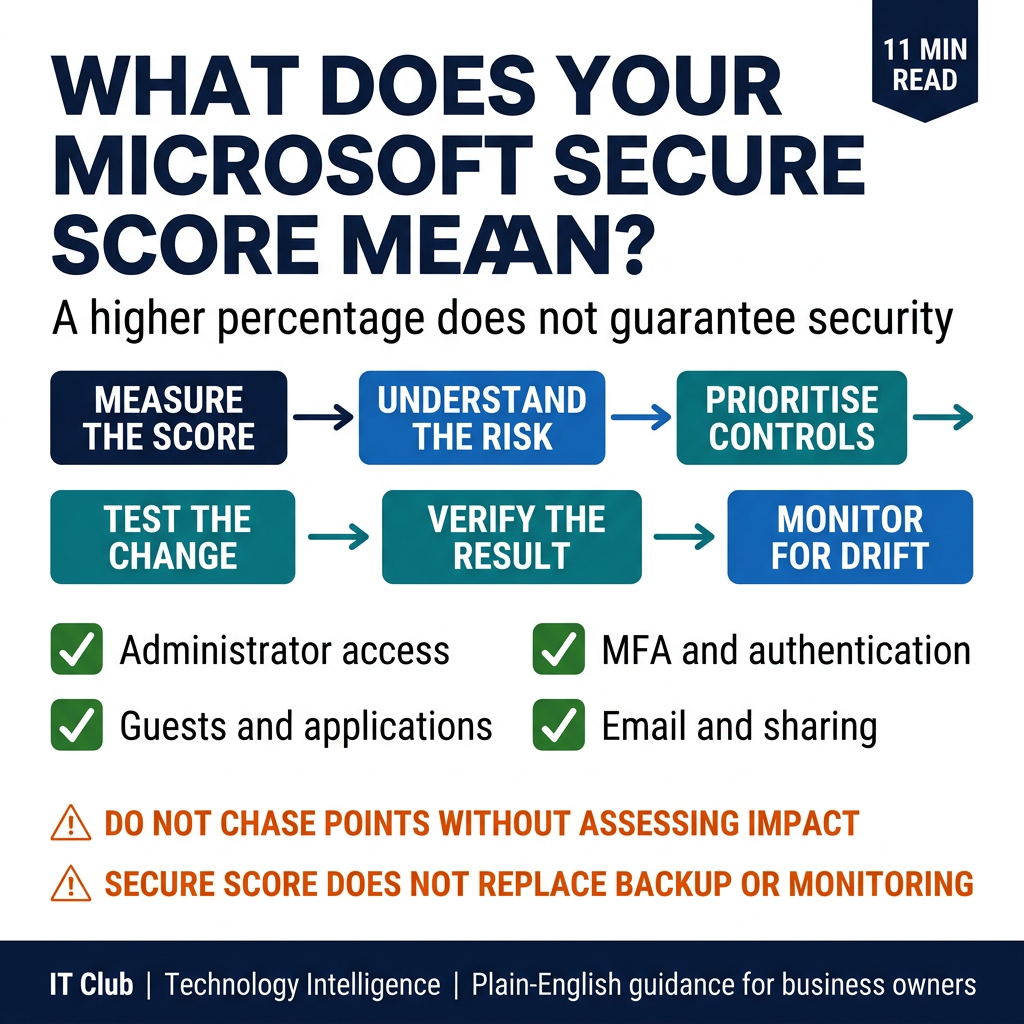
Tap to follow The IT Club Channel on WhatsApp.
Related Articles
1Password Wants AI Agents to Sign In Without Seeing Your Password
1Password’s new agent platform is designed to keep credentials hidden while a person approves a sign-in. It does not control everything an agent can do after login.
Read articleAI Helped Find Serious PHP Security Flaws. What Should Website Owners Do?
Two critical PHP vulnerabilities were disclosed in October 2026. The important lesson for a website owner is to check that the right maintainer has applied the fixes.
Read articleHow Can You Check Who Is Behind an Online Profile?
AI can make convincing profile pictures, voices and videos. Use independent checks and sensible boundaries rather than trusting appearance alone.
Read articleNeed help putting this into practice?
IT Club helps you understand the technology. If you need implementation, support or consultancy, the teams behind IT Club can help.
Altitude IT (opens in a new tab) — IT support, cyber security, Microsoft 365 and technology operations.
Altitude AI (opens in a new tab) — AI discovery, automation, governance and implementation.