How Professional Services Businesses Can Turn Repetitive Work into Safe AI Workflows
IT Club provides general technology information and guidance. Content relating to regulation, compliance, cybersecurity or AI governance is provided for general information and should not be treated as legal, regulatory or certification advice. Requirements vary by organisation and jurisdiction. Obtain appropriate professional advice where necessary.
Professional-services businesses can use AI to extract information, prepare records, draft first versions and check authorised external systems. The safest workflows begin with repetitive, well-understood tasks and retain human verification before important information is accepted or any external action occurs. AI should reduce administrative effort while professionals retain judgement, accountability and approval.
A professional-services business — whether a law firm, accountancy practice, consultancy, surveying business, insurance broker or HR consultancy — has a constant stream of documents arriving and a constant need to process them. A new instruction arrives. Someone reads it, identifies the key facts, copies information into a system, creates tasks, calculates dates, drafts a standard document and prepares a summary for the responsible professional.
Each step may take fifteen to sixty minutes. Repeated several times a week, across a team, it consumes substantial professional time that could be spent on judgement, advice and client work.
The best first AI workflow is rarely the most impressive process. It is usually the repetitive task everybody understands and nobody wants to keep doing manually.
AI can reduce the administrative cost of that preparation work — but only when the workflow is designed carefully, the data is controlled, human review is built in and the professional retains responsibility for every important decision.
The Quick Answer
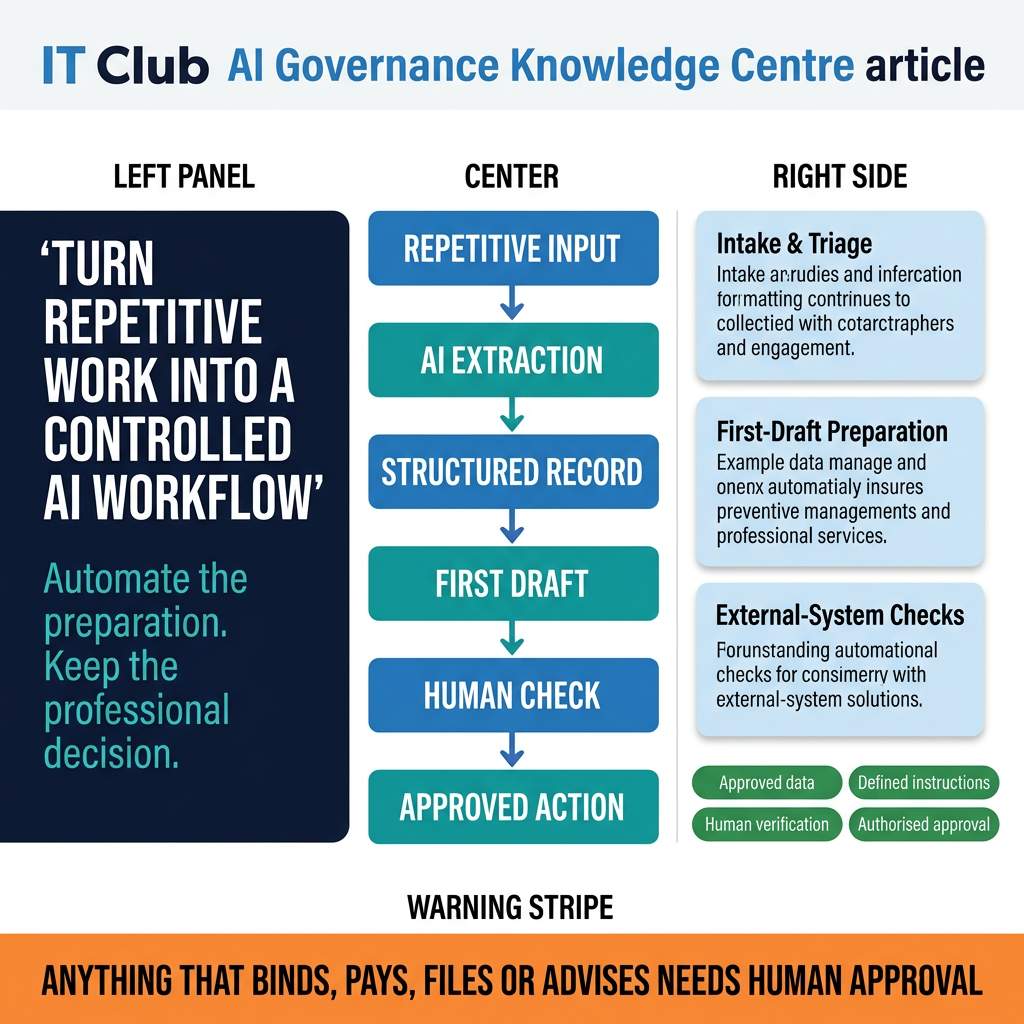
A good AI workflow takes a defined, repetitive process and separates it into:
- 1Information collection
- 2Structured extraction
- 3Draft preparation
- 4Exception reporting
- 5Human verification
- 6Approved action
Start with work that is repetitive, well understood, low or moderate risk, easy to verify, based on consistent inputs and reversible where possible.
Do not begin with final professional advice, irreversible decisions, payments, legal filing, disciplinary action, unrestricted customer communication or production system changes.
The more serious the consequence of an error, the stronger the human review and approval must be.
Workflow 1 — Intake and triage
The intake-and-triage pattern applies wherever a new document, enquiry, claim, instruction, request or case arrives and needs to be understood, recorded and assigned. Examples include new legal matters, insurance claims, client onboarding, supplier questionnaires, property instructions, HR cases, technical support escalations and accountancy records.
The AI step in an intake workflow may read approved documents, extract names, dates and references, identify the subject, classify the request, produce a structured summary, identify missing information, create a draft task list, prepare questions, propose deadlines and create a draft database record.
The human role is not optional. A qualified person verifies the extracted information, checks deadlines independently, confirms the classification, assesses risk, approves the record and decides the next action. The AI has done the extraction. The professional has done the thinking.
AI can prepare the file. It should not silently decide the professional position.
Calculations that carry legal, financial or regulatory consequences always require independent verification. Any AI-proposed deadline involving a limitation period, tax date, interest calculation, notice period, payroll date, financial exposure or contractual requirement must be checked by a qualified person against the primary source — not accepted because the output looks confident.
Workflow 2 — First-draft preparation
The first-draft pattern applies wherever a professional needs a starting document — a report, letter, brief, assessment, proposal or filing — that draws on approved source material. The input is approved source documents, previous examples, instructions and a defined objective. The output is a first draft for professional review.
The AI step may propose an outline, identify relevant facts, produce a first draft, apply an approved tone, highlight missing evidence, separate facts from assumptions, flag uncertain statements and produce a structured working document. The professional approves the plan, checks every factual claim, checks sources, applies judgement, rewrites the argument where necessary, removes unsupported statements and approves the final document.
A draft that sounds professional can still be factually wrong.
A safer sequence for draft preparation: ask for a plan and review it before proceeding; supply approved evidence; produce the first draft from that evidence; verify every important statement against its source; complete professional review; approve the final output. Skipping straight to the draft without approving the plan increases the risk of wasted effort and unchecked errors.
Using previous work from the organisation's own files can help establish structure, tone, terminology, formatting preferences and recurring sections. However, this requires care. Previous files may contain client confidentiality, legal privilege, personal data, embedded document metadata, tracked changes or comments, outdated advice, historical errors or copyright material. A separate working copy stripped of unnecessary detail is better than processing original client files directly.
Do not supply confidential client information or privileged material to an AI tool without first confirming that the tool's terms, data-processing agreements, retention settings and supplier arrangements permit and protect that use. This question is covered in detail in the confidential information and supplier assessment guides.
Workflow 3 — Checking external systems
The external-system-checking pattern applies wherever the business needs to monitor an authorised portal, register or data source against a known list of references. Examples include checking planning applications, monitoring tender portals, reviewing supplier status, checking court schedules, monitoring licence renewals, reviewing service dashboards, monitoring regulatory updates and confirming order status.
The AI or automation step may open an authorised portal, search defined references, collect current status, compare results against an internal list, identify changes, produce exceptions and prepare an alert. The human role is to verify critical findings, check missing results, investigate access errors, confirm high-risk deadlines and decide the response.
Being technically able to automate a website does not automatically mean the organisation is permitted to do so.
Any automation that accesses an external system must respect the system owner's authorisation, the website's terms of service, any API conditions and rate limits, applicable data-protection requirements and any access controls in place. Checking whether the business holds authorised access is a prerequisite, not an afterthought. Browser automation that bypasses controls or rate limits may violate terms of service and, in some cases, applicable law.
From prompts to repeatable workflows
There is a meaningful difference between a one-off prompt, a reusable instruction, a workflow and an AI agent.
A one-off prompt is an instruction written for a single task. A reusable instruction is a controlled template describing how a recurring task should be completed — the same process, applied consistently. A workflow combines inputs, instructions, tools, data, checks, approvals, outputs and records into a defined sequence. An AI agent is a system that may perform multiple steps, use connected tools, retry failed actions and take decisions without human input at each step.
Repeatability matters more than clever prompting. A well-designed workflow should behave consistently, stop when uncertain and make review easier — not harder.
A reusable workflow instruction should define
- Purpose — what the workflow exists to achieve
- Permitted sources — what information may enter
- Prohibited information — what must stay out
- Required output — format, structure, level of detail
- Uncertainty handling — what to do when the input is ambiguous or incomplete
- Verification requirements — what must be checked by a person before use
- Approval point — what must be explicitly authorised before external action
- Storage location — where output is saved
- Incident route — how failures and unexpected outputs are reported
- Review date — when the instruction is next assessed
Document and knowledge preparation
AI output improves when the source information is organised before it enters the workflow. Practical preparation steps include removing duplicate documents, identifying the authoritative version, creating a clear folder structure, adding a short matter or project brief, labelling document dates, separating public and confidential material, creating controlled working copies, removing unnecessary personal data, converting documents into accessible formats where appropriate, creating a source index, recording ownership and applying retention rules.
A separate working folder — sometimes called a mirror folder — can reduce accidental exposure of original files, but it does not automatically solve confidentiality, legal privilege, access control, retention obligations, supplier processing terms, deletion, international transfer or contractual restrictions. It is a practical organising step, not a complete solution.
Better organised information improves AI performance, but only approved information should enter the workflow.
Anonymisation and redaction
Removing a name does not always anonymise a person. Case facts, job titles, locations, dates and incident details may still identify an individual. This matters because a document that appears to have been anonymised may still contain personal data under UK data protection law.
Beyond names, document metadata may contain author names and revision history. Comments and tracked changes may remain visible or recoverable. Hidden spreadsheet tabs may contain data not visible on screen. Visual covering — placing a shape or colour over text — does not remove the underlying text in a digital document. Filenames may expose matter references, client names or case identifiers.
Safer alternatives to simple name deletion include: genuine data minimisation — providing only the information the workflow actually needs; using approved redaction tools rather than visual covering; replacing personal details with consistent placeholders; creating synthetic test examples that do not use real case facts; maintaining separate test data; inspecting metadata before sharing or uploading; applying access controls; and carrying out human review of any output that might re-identify an individual.
The personal data guide covers lawful basis, roles and practical steps for any AI use involving identifiable information. The confidential information guide covers privilege, contracts and professional obligations.
Human approval model
Not every AI output requires the same level of approval. A practical model distinguishes four levels:
Level 1 — Internal assistance: summarisation, categorisation, formatting, brainstorming. These outputs support the professional's work but do not leave the business and do not create records. Routine review is appropriate.
Level 2 — Business records: CRM updates, case records, deadlines, task creation, internal recommendations. These outputs enter systems and may affect how work is managed. Verification before acceptance is required.
Level 3 — External output: client emails, reports, advice, public content, supplier instructions. These outputs leave the business and carry the business's name. Responsible human approval is required.
Level 4 — Irreversible or regulated action: court filing, payment, contract execution, employee decision, compliance submission, production system change. These outputs create obligations, transfer funds or affect regulated processes. Explicit authorised approval and, where appropriate, qualified professional review are required.
Anything that binds, pays, files, publishes or advises should not leave the business merely because an AI workflow produced it.
Start with quick wins
Early AI workflow projects should be repetitive, visible, easy to compare against previous results, low risk, reversible, owned by one team and measurable. Potential first projects include meeting summaries, intake checklists, document classification, first-draft emails, missing-information lists, internal briefing notes, task creation, approved FAQ drafting, document comparison and status-report preparation.
The first workflow teaches the organisation where AI makes mistakes, what data it actually needs, what users need the output to contain, what checking genuinely costs in professional time, which controls work in practice and whether time is genuinely saved across the whole process — including the review step.
The first workflow should build organisational judgement — not attempt to prove that AI can run the department.
Measuring the result
Measuring an AI workflow only by speed misses most of what matters. A useful performance review includes: time spent on the process before the workflow; time spent after, including review; professional review time that the workflow still requires; error rate in AI output; missed exceptions; user satisfaction; client impact; rework required; tool cost; support cost; security incidents; data exposure events; workflow failures; and overall business value.
Saving 40 minutes is not a benefit if checking and correcting the output takes an hour.
AI workflow design checklist
Before building or approving a new AI workflow, work through these questions:
Process: Is the process written down? Is it repeated regularly? Are the inputs reasonably consistent? Is the current owner known?
Risk: What happens if the output is wrong? Is the action reversible? Could a person suffer harm? Is professional judgement involved?
Information: What data enters the workflow? Is personal data involved? Is confidential information involved? Can safer test data be used?
System: Is the AI tool approved? Are connected services approved? Are permissions limited? Are actions logged?
Output: Is the required format defined? Must uncertainty be shown? Are sources required? Are missing details flagged?
Review: Who checks the output? What must be checked independently? Who approves external action? Can the workflow stop safely?
Performance: How will time saved be measured? How will errors be recorded? Is the process reviewed periodically? Can the workflow be retired?
Warning signs
Pause the workflow and review the design where any of these apply:
- Nobody can describe the current process
- The source information is disorganised
- Confidential data is copied casually into AI tools
- The AI uses unrestricted personal accounts
- The output affects rights or legal obligations
- Deadlines are accepted without independent checking
- Sources cannot be opened or verified
- External action occurs without approval
- Browser automation bypasses controls
- One AI account holds broad system access
- Failed runs are not recorded
- The business measures speed but not errors
- Users trust polished wording without verification
- The workflow has no named owner
- Nobody knows how to stop it
- The system has become business-critical without support or documentation
A workflow that nobody owns will eventually become an automation nobody trusts.
The IT Club view
The most useful examples of AI in professional services are not the ones where AI replaces professional judgement. They are the ones where AI handles preparation, extraction, organisation, repetitive checking and first drafts — while the professional retains strategy, judgement, accountability, approval and client responsibility.
The value of AI comes from combining machine speed with human judgement — not pretending one can replace the other.
IT Club recommends mapping the process before building anything; beginning with a contained, well-understood workflow; minimising the data used; defining how the workflow handles uncertainty; requiring human review before output is accepted; restricting external action to explicitly approved steps; measuring errors as well as time; recording incidents; assigning a named owner; and reviewing the workflow through an Operational Heartbeat.
Do not begin by asking which jobs AI can replace. Begin by finding the repetitive steps that stop skilled people doing skilled work.
Operational Heartbeat
A recurring review of any AI workflow should check: the named workflow owner; its stated business purpose; the AI tools and connected systems in use; the permissions granted; the source data in use; whether personal or confidential information has entered the workflow; whether instructions have changed; whether the underlying model has changed; error rates since the last review; how much human-review time the workflow still requires; what external actions it has triggered; any incidents or unexpected outputs; user feedback; business value delivered; any supplier or tool changes; access arrangements; and the date for the next review.
AI workflows need an Operational Heartbeat: purpose, information, permissions, errors, approvals, incidents and business value should be reviewed rather than assumed to remain under control.
Related Business Questions
What is an AI workflow?
An AI workflow is a defined sequence combining inputs, instructions, tools, data, checks, approvals, outputs and records. Unlike a one-off prompt, a workflow is designed to run consistently for a recurring task.
What is the difference between a prompt and a workflow?
A prompt is an instruction written for a single task. A workflow is a structured, repeatable process that applies the same approach to a recurring class of work — with defined inputs, outputs, checks and approval points.
What is an AI agent?
An AI agent is a system that can perform multiple steps, use connected tools, retry failed actions and take decisions without human input at each stage. Agents can act autonomously within defined permissions. This makes careful permission design and approval controls especially important.
Do I need to code to build an AI workflow?
Not always. Some workflow tools offer no-code or low-code configuration. However, no-code tools do not remove governance, data-protection or technical risk — they change who is responsible for configuration. Someone still needs to design the workflow, test it, review it and own it.
Which business processes should use AI first?
Repetitive, well-understood, low-risk, reversible processes that are easy to measure are the strongest candidates. Meeting summaries, intake checklists, document classification, first-draft emails, missing-information lists and internal briefing notes are typical first projects. Avoid irreversible actions, regulated decisions and external communications until controls are established.
Should AI calculate business deadlines?
AI can propose a deadline based on information extracted from a document. That proposal must be verified independently against the primary source by a qualified person. A legally significant deadline — limitation period, tax date, notice period, regulatory submission — should never be accepted from an AI workflow without human confirmation.
Can AI create tasks automatically?
AI can draft a task list based on extracted information. Those tasks should be reviewed and approved by the responsible person before they are accepted into a case or project management system. Creating tasks automatically without review risks missing obligations or creating incorrect records.
Can AI update a CRM?
AI can prepare a draft record for CRM entry. A responsible person should verify the extracted information and approve the record before it is created or updated. Automated CRM updates without review can propagate errors into records used across the business.
Can AI draft professional documents?
AI can produce a useful first draft from approved source material. The professional must verify every factual claim, check sources, apply judgement and approve the final document. A first draft is a starting point — not a finished product and not professional advice.
Can AI learn a company writing style?
Some AI tools can apply a consistent tone from example documents. Using previous work as examples requires careful handling — earlier files may contain client confidentiality, privilege, personal data, embedded metadata or historical errors. Use synthetic examples or carefully reviewed samples where possible.
Can AI check external websites?
AI or automation tools can read authorised external portals and compare results against an internal list. The business must hold authorised access, comply with the website's terms of service and respect any rate limits or API conditions. Browser automation that bypasses controls is not appropriate.
Is browser automation always permitted?
No. Being technically able to automate a website does not automatically mean the business is permitted to do so. The website's terms of service, any API conditions, access controls and applicable law all apply. Check authorisation before automating any external system.
How should confidential documents be prepared?
Create a controlled working copy. Remove unnecessary personal data. Identify the authoritative version. Separate public and confidential material. Inspect document metadata. Keep original files separate from AI working materials. Confirm that the AI tool's terms, data-processing agreement and retention settings are appropriate for the information being supplied.
Is deleting a name enough to anonymise a document?
Usually not. Case facts, job titles, locations, dates and incident details may still identify an individual. Document metadata, comments, tracked changes and hidden spreadsheet tabs may remain. Use genuine data minimisation, approved redaction tools and synthetic test data rather than simple name removal.
What is a mirror working folder?
A working copy of a matter or project folder, stripped of information the AI workflow does not need. It reduces the risk of exposing original files but does not automatically solve confidentiality, privilege, retention, supplier processing, deletion or access control obligations.
Should AI have access to original client files?
Generally not. Providing a controlled working copy with only the information the workflow actually needs reduces the risk of unnecessary disclosure. The less information an AI tool receives, the smaller the exposure if something goes wrong.
What should require human approval?
Any output that will leave the business, create a business obligation, affect a person's rights, trigger a payment, submit a filing or result in a regulated decision should require explicit human approval. Internal summaries and drafts can proceed with lighter review — but the more serious the consequence of an error, the stronger the approval must be.
Can AI send customer emails automatically?
No, without explicit approval. Customer emails carry the business's name and create expectations. An AI workflow can draft and queue an email. A responsible person should approve it before it is sent — unless the content is so constrained, verified and low-risk that automatic sending has been explicitly assessed and approved.
Can AI submit legal or regulatory documents?
No without qualified human approval. Court filings, regulatory submissions and compliance documents carry legal obligations. They must be reviewed and explicitly approved by a qualified professional before submission. An AI workflow can prepare the draft. It should not trigger the submission.
How should AI errors be measured?
Track: error rate in AI output; missed exceptions; rework required; review time per output; incidents; data exposure events; workflow failures. Compare these against the time and professional capacity saved. A workflow with a low error rate that still requires significant review time may not deliver the expected benefit.
What should an AI workflow log?
Logs should capture: the input received; the instruction applied; the output produced; who reviewed the output; what was approved; any exceptions or errors; and the date and time. Logs support incident investigation, periodic review and professional accountability.
How often should AI workflows be reviewed?
At least quarterly, and whenever the tool, model, instructions, connected systems or business process changes. AI workflows should be treated like any other business process — owned, documented and periodically reviewed, not deployed and forgotten.
Can IT Club help assess an AI workflow?
Yes. Submit a question through Ask the Advisor and an IT Club advisor will provide plain-English guidance on mapping a workflow, choosing a low-risk starting point, protecting business information or deciding where human approval should remain.
Plain-English Takeaway
Professional-services businesses can use AI to extract information, prepare records, draft first versions and check authorised external systems. The safest workflows begin with repetitive, well-understood tasks and retain human verification before important information is accepted or any external action occurs. AI should reduce administrative effort while professionals retain judgement, accountability and approval.
Related intelligence
A Technology Intelligence article that goes deeper on this topic
Building Safe AI Workflows in Professional Services
Read the articleSources and further reading
- ICO — Artificial intelligence guidance and resources
- NCSC — AI and cyber security: what you need to know
- GOV.UK — AI regulation: a pro-innovation approach
- ICO — Data minimisation
- ICO — Anonymisation: managing data protection risk
External guidance changes. Check the source itself for the current position before acting on it.